Here is a simple transistor battery charger it can charge batteries up to 12v in series. It has an LED and a few parts.
Circuit
To use it you must decide on a power supply voltage, current limit resistor, and number of cells. First to figure out what voltage to use you must know the total battery series voltage. Batteries in series their voltages adds up.
Battery series voltage(B1)
minimum(V1)
maximum(V1)
1.2v
6.5v
10v
2.4v
7.5v
11v
3.6v
9.6v
12v
4.8v
10.5v
13v
6v
12
15v
7.2v
13.2v
16v
8.4v
14.5v
18v
9.6v
15.6v
18v
10.8v
16.8v
19v
12v
18v
21v
Just pick a number of batteries in series that matches its output voltage. The power supply voltage must not go below minimum voltage or over the maximum voltage(as seen in the table above)
Now that we figured power supply voltage and battery count we must figure out the current limit resistor(R2). This charger will take 15 hours to charge. To figure out we need to know amp-hour of one battery. All batteries must have the same amp-hour rating. The current should be limited to ten times less than the amp-hour rating. So if it is 1000mAh the resistor should limit it to 100mA.
Amp-Hour rating:mAh
The calculated times small should be close to 10.
To use more than 10 cells multiply the number of parts. D1 is a standard 1A or higher rectifier diode. The charger should be turned off when it is done charger. The LED should change its state. Also, currents add up. The circuit originally came from ElectronicsYard
Today I began working on my Capacitor box. It’s value is in binary obtain from switches.
If you can’t get perfect Capacitance from each switch you can use multiple in parallel or series.
For capacitors in series the value is:
$$Ct=\frac{1}{\frac{1}{C1}+\frac{1}{C2}}$$
Both equations can have any amount of capacitors the variable Ct is the total Capacitance
For capacitors in parallel the value is:
$$Ct=C1+C2+C3$$
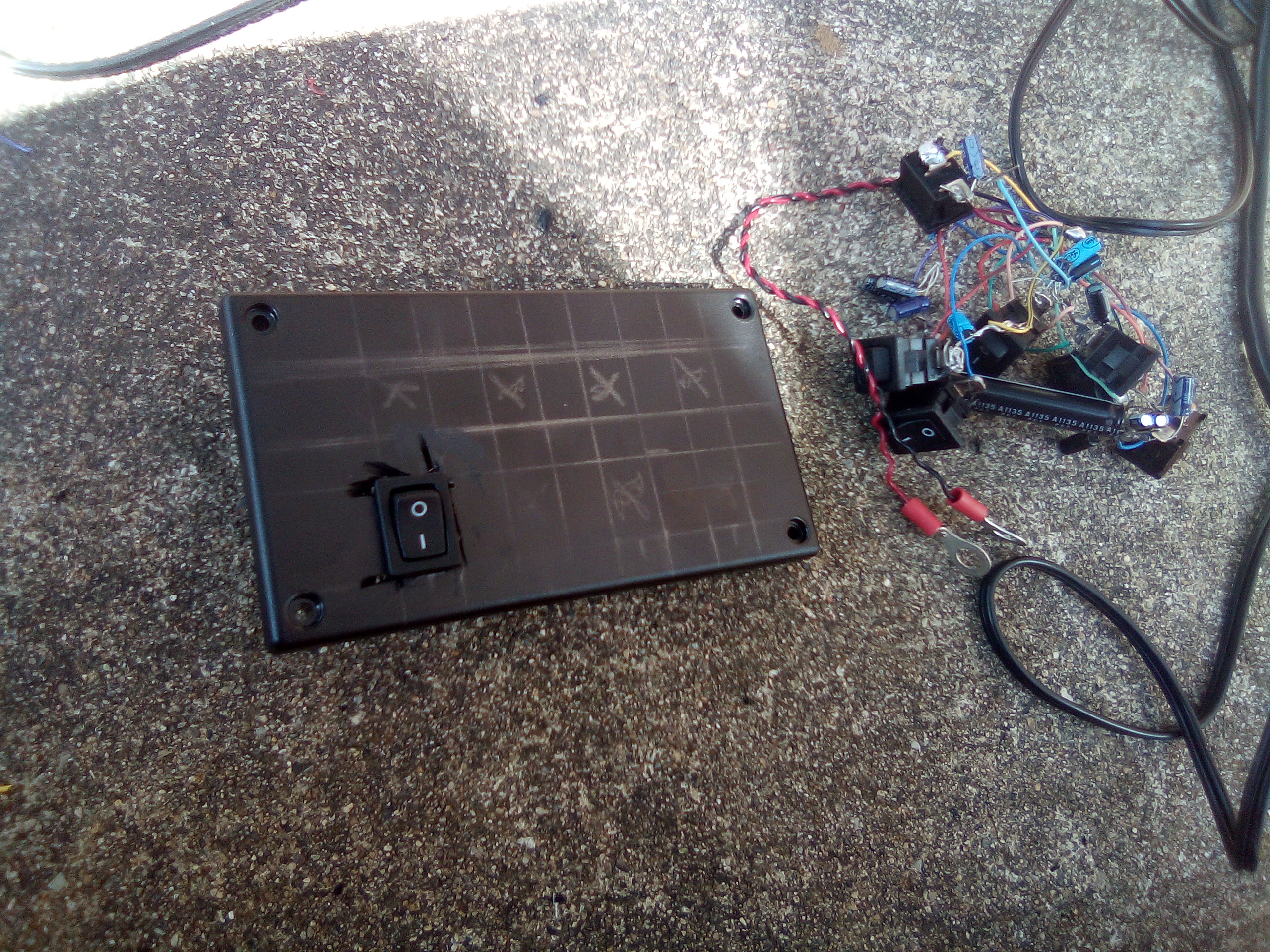
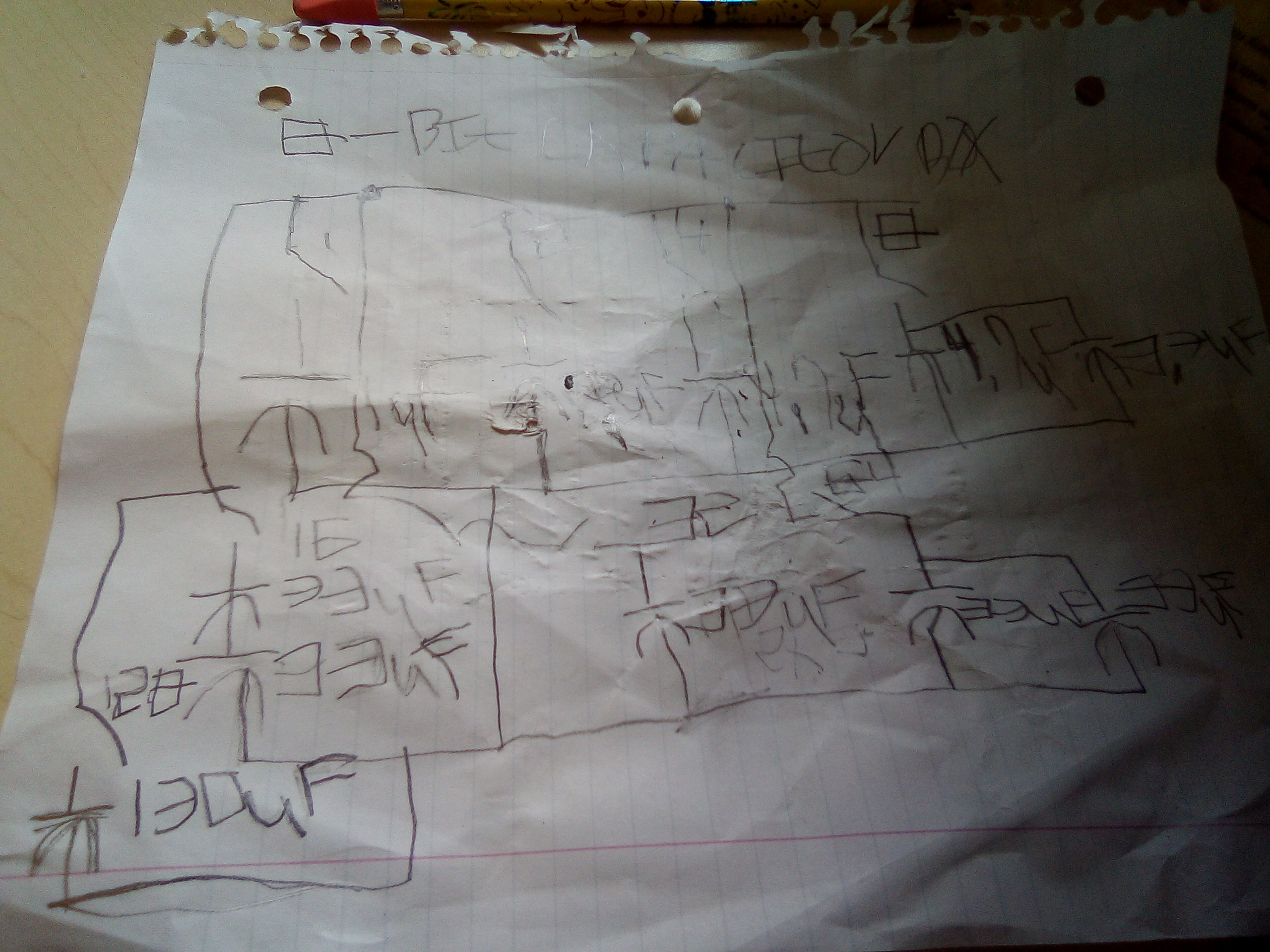
So far only one switch is mounted. Soon more it will be finished. Each switch is in parallel with the polarity the same. Below is a schematic of the Capacitance box. You may need to put extra capacitors in parallel so that the box is more accurate. Also I had to cut the wires so I can mount the switches. Each switch in the schematic has the binary value right by the switches
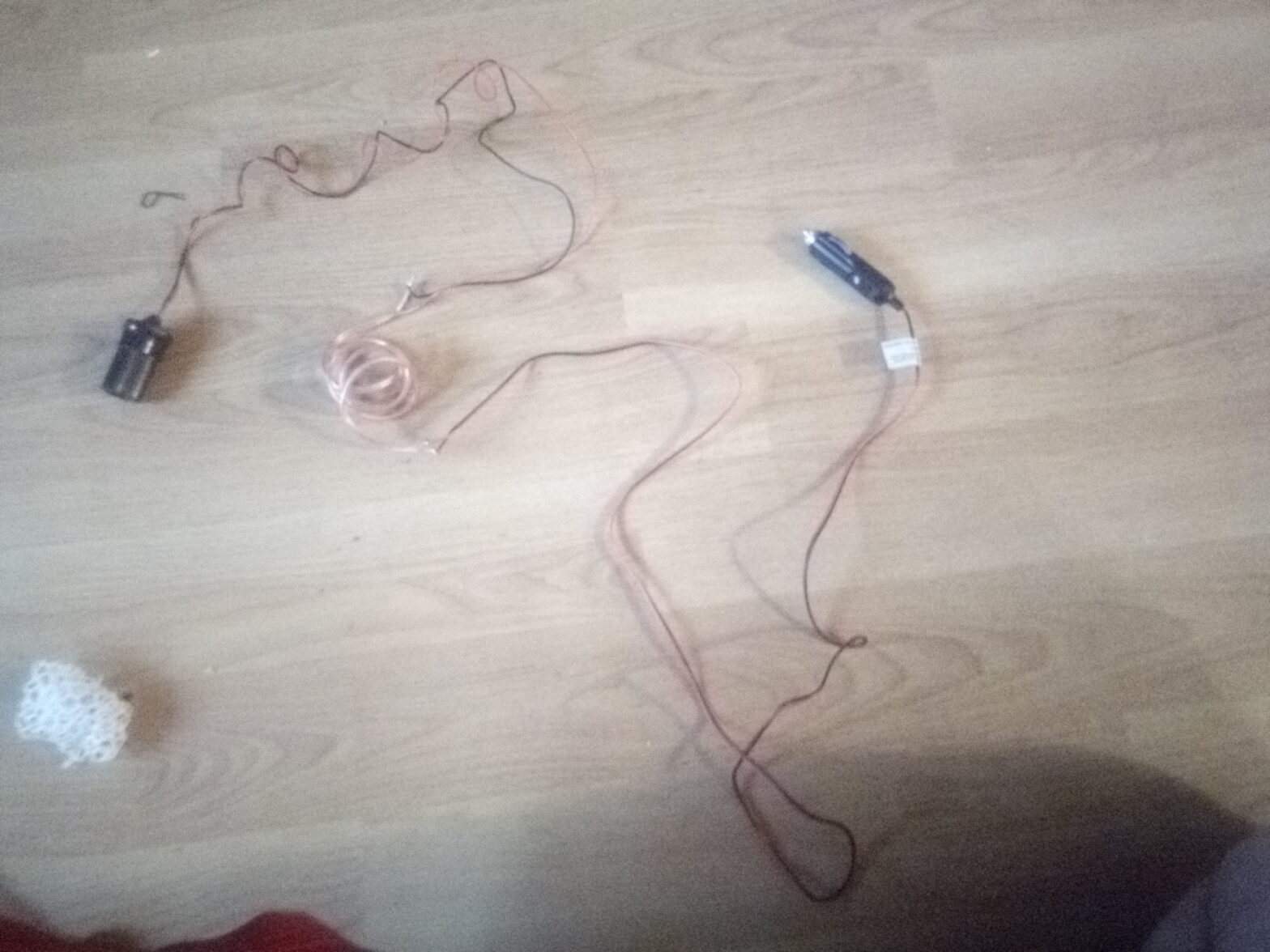
This do-it-yourself extension cord is simple and straight forward. The reason! Why I built it was to make my cell phone reach the outlet. I just used 2 strains of wires connected to both ends. The one I built has 3 different kinds of wires. This is because I wanted to build it out of what I had. I added it up and it should be over 9 foot
Here’s what you need:
A cigarette lighter female and male connectors(with or without wires pre-soldered)
A pair of wires (color coded preferred, doesn’t have to be color coded it should be hookup or speaker wire)
A roll of rosin core solder (don’t use acid core solder or plumbing solder) if you don’t want to solder then you could use butt connectors,but you will need to crimp them. Butt connectors are totally useless if you just get the connectors without pre-soldered wires.
Electric tape or heatshrinks(needed to make sure that the solder joints don’t touch)
This app draws text on the top left corner of the screen. It has UTC Time, Uptime, last IRC Channel message in mIRC, Error Of The Day, Memory Load, IP Addresses and Phase Of The Moon. It’s lightweight and open source.
All programs are virus free. Some antivirus software might say its "suspicious" or a "Potentionaly Unwanted Program". Some of them rate them on what there code looks like no matter if theres a definition in the virus database. If any of them are detected any Antivirus I will zip the software with the password "justin" j is lowercase
program delpfo;
{$RESOURCE DelpFo32.RES}
uses   SysUtils,   Windows,   graphics,   Classes,   mIRCc in '..\delphi\TmIRCControl\mIRCc.pas';
const AppName='delpFo'; DB_HOLIDAY_DATE='%u/%u'; DB_HOLIDAY_YEAR=DB_HOLIDAY_DATE+'.year'; DELPFO_ATOM_CLOSE='DELPFO_CLOSE'; DELPFO_ATOM_MAIN='DELPFO_APP'; SWITCH_MOON='/MOON'; SWITCH_HOLIDAY='/HOLIDAY'; SWITCH_CLOSE='/CLOSE'; SWITCH_UTC='/UTC'; SWITCH_UPTIME='/UPTIME'; SWITCH_MEM='/MEM'; SWITCH_BOLD='/BOLD'; SWITCH_IPV4='/IPV4'; SWITCH_RIGHT='/RIGHT'; SWITCH_POSX='/POSX'; SWITCH_ERROR='/ERROR'; SWITCH_MIRC='/MIRC'; SWITCH_POSY='/POSY'; SWITCH_FC='/FC'; SWITCH_FONT='/FONT'; SWITCH_FSIZE='/FSIZE'; type TMoonInfo=record MoonType:byte; end; var utc,moontime:systemtime; monitor:tcanvas; args,IPs:tstringlist; i:integer; uptime:tdatetime; moon:tmooninfo; Text:string; mem:memorystatus; hk,netadaptors:hkey; enabledhcp,netcount,rs:dword; mIRC:TMIRCControl; buff,kname:array[0..max_path]of char; r:trect; label loop; procedure close; var error:dword; begin error:=0; if globaldeleteatom(globalfindatom(DELPFO_ATOM_CLOSE))>0then error:=error or 1; if Globaldeleteatom(globalfindatom(delpfo_atom_main))>0then error:=error or 2; if releasedc(getdesktopwindow,monitor.handle)=0then error:=error or 4; mirc.Destroy; exitprocess(error); end; function PhaseOfMoon(var systime:systemtime):TMoonInfo; var b,c,e,jd:double; begin systime.wMonth:=systime.wMonth-1; if systime.wMonth<3then begin systime.wYear:=systime.wYear-1;systime.wMonth:= systime.wMonth+12;end;systime.wMonth:=systime.wMonth+1;c:=365.25*systime.wYear; e:=30.6*systime.wMonth;jd:=c+e+systime.wDay-694039.09;jd:=jd/29.5305882;b:=trunc( jd);jd:=jd-b;b:=round(jd*8); if b >= 8 then b:=0; result.MoonType:=trunc(b); end; function ErrorOfTheDay:integer; label loop; begin randseed:=trunc(date); loop:result:=random(16000); if length(SysErrorMessage(result))=0then goto loop; end; function FormatHoliday(fmt:string;systime:systemtime):string; begin result:=format(fmt,[systime.wMonth,systime.wDay]); end; function getHoliday:string; var ltime:systemtime; res:tresourcestream; holidays:tstringlist; begin getlocaltime(ltime); holidays:=tstringlist.Create; res:=tresourcestream.Create(hinstance,'HOLIDAYS','DATABASE'); holidays.LoadFromStream(res); result:=format(holidays.values[formatholiday(db_holiday_date,ltime)],[ltime.wyear- strtointdef(holidays.values[formatholiday(db_holiday_year,ltime)],0)]); holidays.Free; res.Free; end; begin args:=tstringlist.Create; for i:=1to paramcount do args.Add(paramstr(i)); if args.Count=0 then begin messagebox(0,pchar( 'Usage:'+extractfilename(paramstr(0))+' <parameters>'#13#10+ '/UPTIME          Shows uptime'#13#10+ '/MEM             Global memory status'#13#10+ '/UTC             Universal Time Coordinates'#13#10+ '/IP4             Shows IPv4 Addresses'#13#10+ '/MOON            Shows phase of moon'#13#10+ '/POSX=x /POSY=y  Position on the screen where to draw text'#13#10+ '/RIGHT           Draw onto top right'#13#10+ '/FONT=NAME       Specifies font-name.'#13#10+ '/FC=COLOR        Font-color in hexadecimal'#13#10+ '/FSIZE=SIZE      Font size'#13#10+ '/ERROR           Error of the day'#13#10+ '/MIRC=Channel    Shows the last chat channel message in mIRC'#13#10+ '/HOLIDAY         Shows the current holiday, if theres is one.'#13#10+ '/BOLD            Use Bold Font' ),'DelpFo Help',0); exitprocess(0); end; if args.IndexOf(SWITCH_CLOSE)>-1then begin if globalfindatom(delpfo_atom_main)>0then begin globaladdatom(delpfo_atom_close);globaldeleteatom(Globalfindatom(delpfo_atom_main)); end else begin Messagebox(0,PChar(loadstr(106)), appname,mb_iconinformation);exitprocess(dword(-1)); end; exitprocess(0); end; if globalfindatom(DELPFO_ATOM_MAIN)>0then begin messagebox(0,pchar(loadstr(104)),appname,mb_iconwarning);exitprocess( error_already_exists); end; globaladdatom(delpfo_atom_main); getclientrect(getdesktopwindow,r); r.TopLeft.x:=StrToIntDef(args.values[switch_posx],0); r.TopLeft.y:=strtointdef(args.values[Switch_posy],0); monitor:=tcanvas.Create; monitor.Handle:=GetWindowDC(getdesktopwindow); if args.IndexOfName(switch_font)>-1then monitor.Font.Name:=args.Values[SWITCH_FONT]; monitor.Font.Color:=StrToIntDef('$'+args.values[SWITCH_FC],0); monitor.Font.Size:=strtointdef(args.values[switch_fsize],monitor.Font.Size); if args.IndexOf(switch_bold)>-1then monitor.Font.Style:=[fsBold]; mirc:=tmirccontrol.create(nil); loop: text:=''; getsystemtime(utc);Getlocaltime(moontime); uptime:=encodetime(0,0,0,1)*gettickcount; mem.dwLength:=sizeof(mem); globalmemorystatus(mem); if args.IndexOf(SWITCH_UPTIME)>-1then Text:=format(loadstr(100),[trunc( uptime),formatdatetime(loadstr(101),uptime)]); if args.IndexOf(SWITCH_UTC)>-1 then text:=text+'UTC:'+formatdatetime(loadstr(105), systemtimetodatetime(utc))+#32; if args.IndexOf(SWITCH_MEM)>-1then text:=text+format(loadstr(102),[ mem.dwMemoryLoad]); regopenkey(HKEY_LOCAL_MACHINE, 'SYSTEM\CurrentControlSet\Services\Tcpip\Parameters\Interfaces',netadaptors); regqueryinfokey(netadaptors,nil,nil,nil,@netcount,nil,nil,nil,nil,nil,nil,nil); if args.IndexOf(SWITCH_IPV4)>-1then begin ips:=tstringlist.Create; for i:=0to netcount-1do begin regenumkey(netadaptors,i,kname,max_path); regopenkey(netadaptors,kname,hk); rs:=4; regqueryvalueex(hk,'EnableDhcp',nil,nil,@enabledhcp,@rs); rs:=max_path; if enableDhcp=1then regqueryvalueex(hk,'DhcpIPAdress',nil,nil,@buff,@rs)else regqueryvalueex(hk,'IPAddress',nil,nil,@buff,@rs); ips.Add(buff); regclosekey(hk); end; text:=text+'IPs:'+ips.CommaText; ips.Free; end; text:=text+#32; regclosekey(netadaptors); if args.IndexOf(SWITCH_MOON)>-1then begin moon:=PhaseOfMoon(moontime); text:=text+format(loadstr(103),[loadstr(200+moon.MoonType)]); end; if args.IndexOfName(switch_mirc)>-1then begin mirc.active:=false; mirc.mIRCHandle:=findwindow('mIRC',nil); mirc.Active:=true; text:=text+mirc.GetLastLine(args.values[switch_mirc])+#32; end; if args.IndexOf(switch_holiday)>-1then text:=text+GetHoliday; if args.IndexOf(switch_error)>-1then text:=text+'EOTD:'+ syserrormessage(erroroftheday)+#32; if args.IndexOf(SWITCH_RIGHT)>-1then r.Left:=r.Right-(5+monitor.TextWidth(text)); monitor.TextOut(r.TopLeft.x,r.TopLeft.y,text); if globalfindatom(delpfo_atom_close)>0 then close; sleep(1000); goto loop; end.
When I went for a host home visit Gary left the charger out in the rain. And now it won’t turn on. All four fuses were ok. The output of the charger was zero. The charger is really expensive because of the voltage output being 35 volt at 20 amps. building it is really hard plus keeping it cool is not easy as well.
Bottom board
Top board
I believe that one of the two capacitors has leaked(because of the brown marks right by the vented Capacitor in the top board. The capacitors are 1000uf 50v
If it is possible to charge a battery that was originally used 20 amps with 5 amps instead please let me know
Today I got an idea on a proram I could make that would be useful and unqic, so here it is a calculator that lets you add, subtract and multiply dates and times together. It uses Delphi’s TDateTime variable type that the integer part is the days and fraction part is time.
program timecalc;

{$APPTYPE CONSOLE}
{$RESOURCE TIMECALC_RES.RES}
uses
  SysUtils,
  Windows,
  Classes;
type
TDateTimeOp=function(S1//First parameter for the op
,S2//second parameter for the op
:string):TDatetime;//Answer for the op
var systime:systemtime;//used for UTC Time
exename:string;
ops,//stringlist with op functions in TDateTimeOp type
timeconsts//string list for the constants As PDateTime type
:tstringlist;
pdt:pdatetime;
timefunc:TDateTimeOp;
yMinutes:DWord;
noresult:boolean;

FUNCTION GetDateTime(s:string):tdatetime;
begin
if timeconsts.IndexOf(s)>-1then result:=PDateTime(timeconsts.Objects[
timeconsts.IndexOf(s)])^else
if((strscan(pchar(s),DateSeparator)<>nil)and(strscan(pchar(s),TimeSeparator)<>nil))then
result:=strtodatetime(s)else if strscan(pchar(s),timeseparator)<>nil then result:=strtotime(
s) else if(strscan(pchar(s),DateSeparator)<>nil)then result:=strtodate(s)else if
strtointdef(s,-1)<>-1 then result:=strtoint(s)*encodetime(0,1,0,0)else
NoResult:=true;
end;

function addtime(S1,S2:string):TDateTime;
begin
result:=Getdatetime(s1)+GetDateTime(S2);
end;

function SubTime(S1,S2:string):tdatetime;
begin
result:=GetDateTime(s1)-GetDateTime(s2);
end;
function Multiply(s1,s2:String):TDatetime;
begin
result:=getdatetime(s1)*strtofloat(s2);
end;

begin
exename:=extractfilename(paramstr(0));
if paramcount=0then begin
writeln('Usage:',exename,' [datetimeX] [op] [datetimeY]');
writeln('Ops:');
writeln('+            Addition.');
writeln('-            Subtraction.');
writeln('*            Multiply([datetimeY] is a number not a date or time when this op is used)');
writeln;
writeln('[datetimeX] and [datetimeY] can be date, a time or both');
writeln('If [datetimeX] or [datetimeY] have both date and time they must be surrounded with quotes "hh:mm:ss mm/dd/yyyy"');
writeln;
writeln('[datetimeX] or [datetimeY] can also be one of these operators:');
writeln('NOW                Current local datetime.');
writeln('UTC                UTC Time.');
writeln('WEEK               Length of one week');
writeln('DAY                Length of one day');
writeln('MONTH              Length of one month');
writeln('YEAR               Length of one year');
writeln('DATE               Current local date');
writeln('TIME               Current local time');
writeln('%ERRORLEVEL%       Use the time and date from a previous answer. Use %ERRORLEVEL% variable from the NT Command prompt');
writeln;
writeln('Examples:');
writeln('Add one week from now: ',exename,' NOW + WEEK');
writeln('How much longer until 1:00pm: ',exename,' TIME - 1:00PM');
write('Press enter to quit...');
readln;
exitprocess(0);
end;
ops:=tstringlist.Create;
ops.AddObject('+',tobject(@addtime));
ops.Addobject('-',tobject(@subtime));
ops.AddObject('*',tobject(@multiply));
timeconsts:=tstringlist.Create;
new(pdt);
pdt^:=now;
timeconsts.AddObject('NOW',tobject(pdt));
new(pdt);
getsystemtime(systime);
pdt^:=systemtimetodatetime(systime);
timeconsts.AddObject('UTC',tobject(pdt));
new(pdt);
pdt^:=7;
timeconsts.AddObject('WEEK',tobject(pdt));
new(pdt);
pdt^:=1;
timeconsts.AddObject('DAY',tobject(pdt));
new(pdt);
pdt^:=30;
timeconsts.AddObject('MONTH',tobject(pdt));
new(pdt);
pdt^:=365;
timeconsts.AddObject('YEAR',tobject(pdt));
new(pdt);
pdt^:=DATE;
timeconsts.AddObject('DATE',tobject(pdt));
new(pdt);
pdt^:=TIME;
timeconsts.AddObject('TIME',tobject(pdt));
yminutes:=0;
case ParamCount of
1:begin writeln('Need more parameters');exitprocess(0);end;
2:begin
if ops.IndexOf(paramstr(2))=-1then begin
 writeln(paramstr(2),' is not a valid op');exitprocess(0);
 end else begin
 @timefunc:=Pointer(ops.Objects[ops.indexof(paramstr(2))]);
 yminutes:=trunc(timefunc(paramstr(1),'0')/encodetime(0,1,0,0));
 end;
 end;
3:begin if ops.IndexOf(paramstr(2))=-1then begin
 writeln(paramstr(2),' is not a valid op');exitprocess(0);
 end else begin
 @timefunc:=Pointer(ops.Objects[ops.indexof(paramstr(2))]);
 yminutes:=trunc(timefunc(paramstr(1),paramstr(3))/encodetime(0,1,0,0));
 end;
 end;
else begin writeln('Too Many Parameters');exitprocess(0);end;
end;
if noresult then begin writeln('Bad [datetimeX] or [datetimeY] parameters');
exitprocess(0);end;
writeln(datetimetostr(yminutes*encodetime(0,1,0,0)));
exitprocess(yminutes);

end.
All programs are virus free. Some antivirus software might say its "suspicious" or a "Potentionaly Unwanted Program". Some of them rate them on what there code looks like no matter if theres a definition in the virus database. If any of them are detected any Antivirus I will zip the software with the password "justin" j is lowercase
This is a simple Arduino Binary Clock. It comes with a program that generates the script and uploads it to the arduino board. Part of the code isn’t mine only the part that allows you to get the time from the computer and configure the script to use it.
Built and running displaying 02:05pm
You can download the script maker program from here. You can get this same circuit diagram by opening the program with the /C parameter. There are a lot of command-line options to choose from to configure your Binary Clock. R1 through R13 must have a value that will limit the current enough that it will not break the Arduino or any of its pins. Its probably best to use a 1kilo ohm resistor.
program binclock_uno;

{$APPTYPE CONSOLE}
{$RESOURCE binclock_uno32.RES}
{This program will need binclock.ino added to the resource as ID 1
and type "ARDUINO" You can use Resource Hacker to build binclock_uno32.RES file.
 The schematic is id 1 and type is "JPEG"}

uses
  SysUtils,
  graphics,
  jpeg,
  windows,shellapi,
  Classes;
const INSERT_POINT='//INSERT_POINT';
//To make the program use less memory and file size, we will use format type string constants
STRING_VAR='String %s = "%s";';
ARDUINO_PINVALUES:ARRAY[0..1]OF STRING=('LOW','HIGH');
DEFINE_INTEGER='#define %s %d';
DEFINE_STRING='#define %s %s';
BYTE_VAR='byte %s=%u;';
INO_PATH='%s\%s.ino';
var args,inofile:tstringlist;
res:tresourcestream;
i:integer;
st:systemtime;
exename:string;
herr:hinst;
rs1:longint;
arduino_exename,inocommand,inoname:array[0..max_path]of char;
tid:dword;
function GetConsoleWindow:hwnd;stdcall;external kernel32;
function ConsolePicture(id:integer):dword;stdcall;
//This thread draws the schematic onto the console window
var jpg:tjpegimage;
ConsoleCanvas:tcanvas;
res:tresourcestream;
r:Trect;
label loop;
begin
jpg:=tjpegimage.Create;
res:=tresourcestream.CreateFromID(hinstance,id,'JPEG');
jpg.LoadFromStream(res);res.Free;
consolecanvas:=TCanvas.Create;
consolecanvas.Handle:=getdc(getconsolewindow);
loop:
getclientrect(getconsolewindow,r);
r.Left:=0;r.Top:=0;
consolecanvas.StretchDraw(r,jpg);
sleep(5000);
goto loop;
end;

begin
args:=tstringlist.Create;
for i:=1 to paramcount do
args.Add(Paramstr(i));
exename:=extractfilename(paramstr(0));
if paramcount=0then begin
writeln('Usage:',exename,' /BIAS=OFFSET /MIDNIGHT /C /F=FILENAME /UP /UTC /24 /12 /LED=number /HBTN=ANALOG_PIN /MBTN=ANALOG_PIN /NBTN');
writeln('/UTC       Use UTC Time instead of localtime.');
writeln('/BIAS      Uses a custom timezone bias');
writeln('/12        Use 12-hour format');
writeln('/24        Use 24-hour format');
writeln('/LED       Sets the LED on position logic, 0 for cathode 1 for anode');
writeln('/MBTN      Analog pin for Minute button');
writeln('/HBTN      Analog pin for Hour button');
Writeln('/NBTN      Disable the use of buttons');
writeln('/UP        Automatically upload file to Arduino');
writeln('/F         The output script name(without .ino extension),if omitted it will be stored as binclock\binclock.ino');
writeln('/C         Brings up the circuit diagram for the clock');
writeln('/MIDNIGHT  Use midnight as the starting time instead of computer clock');
writeln;
writeln('Example: Use a LOW value on all digital LED pins and UTC Time and 24-hour format');
writeln(exename,' /UTC /24 /LED=0 /F=MyBinClock /UP');
write('Press enter to quit...');
readln;
args.Free;
exitprocess(0);
end;
if args.IndexOf('/C')>-1Then
begin
createthread(nil,0,@consolepicture,pointer(1),0,tid);
readln;
exitprocess(0);
end;
getsystemtime(st);
if args.IndexOfName('/BIAS')=-1then args.Values['/BIAS']:='00:00';
datetimetosystemtime(systemtimetodatetime(st)-strtotime(args.Values['/BIAS']),
st);
gettimezoneinformation(tz);
if args.indexofname('/F')=-1 then args.Values['/F']:='binclock';
createdirectory(strpcopy(inoname,args.values['/F']),nil);
res:=tresourcestream.CreateFromID(hinstance,1,'ARDUINO');
inofile:=tstringlist.Create;
inofile.LoadFromStream(res);
res.Free;
if(strtointdef(args.values['/LED'],1)<0)or(strtointdef(args.values['/LED'],1)>1)
then begin writeln('Invalid /LED value');args.free;inofile.free;
exitprocess(error_invalid_parameter);end;
inofile.Insert(inofile.indexof(insert_point),format(define_string,['LED_ON',
ARDUINO_PINVALUES[strtointdef(args.values['/LED'],1)]]));
inofile.Insert(inofile.indexof(insert_point),FORMAT(DEFINE_STRING,['LED_OFF',
ARDUINO_PINVALUES[Strtointdef(args.values['/LED'],1)xor 1]]));
if args.IndexOf('/UTC')=-1Then getlocaltime(st);
if(args.IndexOf('/12')>-1)and(args.IndexOf('/24')>-1)then begin
writeln('Cannot use both /24 and /12 parameters at the same time');
args.Free;inofile.Free;
exitprocess(error_invalid_parameter);
end;
if args.IndexOf('/MIDNIGHT')>-1then begin if args.IndexOf('/12')>-1then
st.wHour:=12 else st.wHour:=0;st.wMinute:=0;st.wSecond:=0;end;
if(args.indexof('/24')=-1)and(args.IndexOf('/12')=-1)then begin
writeln('Must have a hour format parameter');inofile.Free;args.Free;
exitprocess(error_invalid_parameter);
end;
if args.indexof('/12')>-1then begin
inofile.Insert(inofile.indexof(insert_point),FORMAT(DEFINE_INTEGER,['HOUR_FORMAT',
12]));
if st.wHour=0then st.wHour:=12;
if st.wHour>12then
 st.wHour:=st.wHour-12;
end else
inofile.Insert(inofile.indexof(insert_point),FORMAT(DEFINE_INTEGER,['HOUR_FORMAT',
24]));
inofile.Insert(inofile.indexof(insert_point),FORMAT(DEFINE_INTEGER,['ANALOG_HSET',
STRTOINTDEF(ARGS.VALUES['/HBTN'],5)]));
inofile.Insert(inofile.indexof(insert_point),FORMAT(DEFINE_INTEGER,['ANALOG_MSET',
STRTOINTDEF(ARGS.VALUES['/MBTN'],0)]));
if args.IndexOf('/NBTN')=-1then inofile.Insert(inofile.indexof(insert_point),
FORMAT(DEFINE_STRING,['BUTTONS_ENABLED','true']))else inofile.Insert(
inofile.indexof(insert_point),FORMAT(DEFINE_STRING,['BUTTONS_ENABLED','false']));
inofile.Insert(inofile.indexof(insert_point),FORMAT(BYTE_VAR,['hour',ST.WHOUR]));
inofile.Insert(inofile.indexof(insert_point),FORMAT(BYTE_VAR,['minute',st.wminute]));
inofile.Insert(inofile.indexof(insert_point),FORMAT(BYTE_VAR,['second',st.wSecond]));
inofile.SaveToFile(format(ino_path,[inoname,inoname]));
writeln('Script saved to ',format(ino_path,[inoname,inoname]));
if args.IndexOf('/UP')>-1then begin rs1:=sizeof(arduino_exename);regqueryvalue(
hkey_classes_root,'Arduino File\shell\open\command',arduino_exename,rs1);herr:=
shellexecute(0,nil,strpcopy(arduino_exename,stringreplace(arduino_exename,' "%1"',
'',[])),strfmt(inocommand,'--upload "%s\%s.ino"',[inoname,inoname]),nil,sw_showdefault);
if herr<33then begin
if herr=0then writeln('Out of resources')else writeln(syserrormessage(herr));
args.Free;inofile.Free;
exitprocess(herr);
end;end;
args.Free;
inofile.Free;
exitprocess(0);
end.
/* Filename binclock.ino
An open-source binary clock for Arduino.
Based on the code from by Rob Faludi (http://www.faludi.com)
Code under (cc) by Daniel Spillere Andrade, www.danielandrade.net
http://creativecommons.org/license/cc-gpl

I modified the code a little bit so it can have
12-hour format and pin configuration.

By Justin Roeder

/* IMPORTANT NOTICE BEFORE ADDING THIS SCRIPT TO THE RESOURCE OF THE GENERATOR EXECUTABLE
YOU MUST REMOVE ALL OF THE LINES UNTIL YOU GET TO //INSERT_POINT
LEAVE //INSERT_POINT IN SCRIPT. THAT TELLS THE GENERATOR WHERE TO PUT THE VARIABLES.
IF YOU ARE JUST GOING TO UPLOAD THHIS SCRIPT TO THE BOARD, YOU CAN LEAVE THE CODE ALONE.
*/
#define LED_ON HIGH //LED Bit on logic
#define LED_OFF LOW //LED Bit off logic
#define HOUR_FORMAT 24 //Change to 12 for 12 hour time
#define ANALOG_HSET 5 //defines hour set button pin
#define ANALOG_MSET 0 //defines minure set buttonpin
#define BUTTONS_ENABLED true //set to false to disable buttons
byte hour=0;
byte minute=0;
byte second=0;
//Start at midnight 00:00:00
//INSERT_POINT

int munit,hunit,valm=0,valh=0,ledstats,i;
void setup() {
//set outputs
for(int k=1;k<=13;k++) {
  pinMode(k, OUTPUT);
}
//set inputs
pinMode(0, INPUT);
}
void loop() {

static unsigned long lastTick = 0; // set up a local variable to hold the last time we moved forward one second
// (static variables are initialized once and keep their values between function calls)
// move forward one second every 1000 milliseconds

if (millis() - lastTick >= 1000) {
  lastTick = millis();
  second++;
}
// move forward one minute every 60 seconds
  if (second >= 60) {
  minute++;
  second = 0; // reset seconds to zero
}
// move forward one hour every 60 minutes
if (minute >=60) {
  hour++;
  minute = 0; // reset minutes to zero
}

if (hour >=24) {
  hour  = 0;
  minute  = 0; // reset minutes to zero
}
if(HOUR_FORMAT==12){
  if(hour>12){hour=hour-12;}
  if(hour==0){hour=12;}
}
  munit = minute%10; //sets the variable munit and hunit for the unit digits
  hunit = hour%10;
  ledstats = digitalRead(0);  // read input value, for setting leds off, but keeping count
  if (ledstats == LOW) {
   for(i=1;i<=13;i++){

    digitalWrite(i, LED_OFF);}

  } else  {

  //minutes units
  if(munit == 1 || munit == 3 || munit == 5 || munit == 7 || munit == 9) {  digitalWrite(1, LED_ON);} else {  digitalWrite(1,LED_OFF);}
  if(munit == 2 || munit == 3 || munit == 6 || munit == 7) {digitalWrite(2, LED_ON);} else {digitalWrite(2,LED_OFF);}
  if(munit == 4 || munit == 5 || munit == 6 || munit == 7) {digitalWrite(3, LED_ON);} else {digitalWrite(3,LED_OFF);}
  if(munit == 8 || munit == 9) {digitalWrite(4, LED_ON);} else {digitalWrite(4,LED_OFF);}

  //minutes
  if((minute >= 10 && minute < 20) || (minute >= 30 && minute < 40) || (minute >= 50 && minute < 60))  {digitalWrite(5, LED_ON);} else {digitalWrite(5,LED_OFF);}
  if(minute >= 20 && minute < 40)  {digitalWrite(6, LED_ON);} else {digitalWrite(6,LED_OFF);}
  if(minute >= 40 && minute < 60) {digitalWrite(7, LED_ON);} else {digitalWrite(7,LED_OFF);}

  //hour units
  if(hunit == 1 || hunit == 3 || hunit == 5 || hunit == 7 || hunit == 9) {digitalWrite(8, LED_ON);} else {digitalWrite(8,LED_OFF);}
  if(hunit == 2 || hunit == 3 || hunit == 6 || hunit == 7) {digitalWrite(9, LED_ON);} else {digitalWrite(9,LED_OFF);}
  if(hunit == 4 || hunit == 5 || hunit == 6 || hunit == 7) {digitalWrite(10, LED_ON);} else {digitalWrite(10,LED_OFF);}
  if(hunit == 8 || hunit == 9) {digitalWrite(11, LED_ON);} else {digitalWrite(11,LED_OFF);}

  //hour
  if(hour >= 10 && hour < 20)  {digitalWrite(12, LED_ON);} else {digitalWrite(12,LED_OFF);}
  if(hour >= 20 && hour < 24)  {digitalWrite(13, LED_ON);} else {digitalWrite(13,LED_OFF);}

}
if(BUTTONS_ENABLED){
 valm = analogRead(ANALOG_MSET);    // add one minute when pressed
   if(valm<800) {
   minute++;
   second = 0;
   delay(250);
  }
  valh = analogRead(ANALOG_HSET);    // add one hour when pressed
   if(valh<800) {
   hour++;
   second = 0;
   delay(250);
  }}
}
How to read the display?
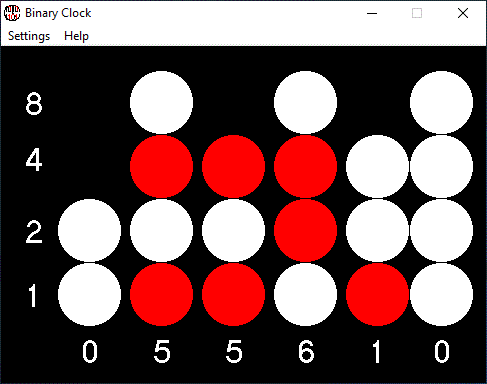
Each column represents a digit. As seen in the circuit diagram. A led has a row number the top LED like D4 in x1Minute is 8 below it is 4, 2, and 1. To get the digit for the column just add the row numbers. Below this paragraph is my binary clock screensaver showing 05:56:10 is read on the screen.
I am going to leave the buttons out of the one I’m building. If you are doing this then use the /NBTN parameter. I will keep you updated
All programs are virus free. Some antivirus software might say its "suspicious" or a "Potentionaly Unwanted Program". Some of them rate them on what there code looks like no matter if theres a definition in the virus database. If any of them are detected any Antivirus I will zip the software with the password "justin" j is lowercase
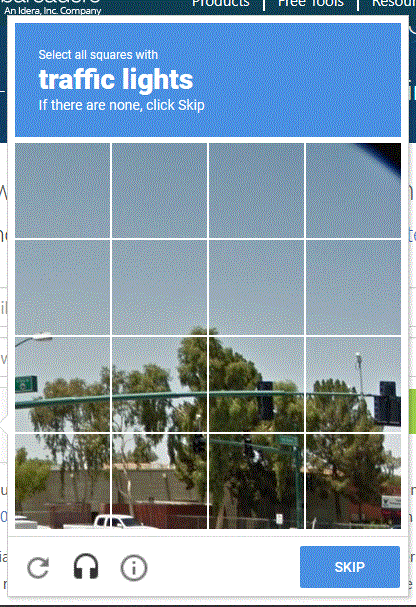
Have you ever want to register something but get this annoying verification check:
google recaptcha on logging in to download Delphi Starter edition
What can I do to prove I’m human an not a robot that doesn’t take hours of clicking?
Do not use VPNs or proxies( such as Tor) reCaptcha looks for that because bots want to be sneaky and they use thoses VPN services to get a way with it. You will be amazed when your not using a those and click on I’m not a robot and it turns into a green checkmark
Type in words that you hear in the audio challenge by clicking the headphone icon. This here is still not easy and can be time consuming
Although some sites have that as a automatic requirement it should be secure enough to click the checkbox
If you are like me and just hate that verification step just leave a comment
Klondike solitaire is the original solitaire game.
Rules:
Only kings can be moved to empty piles
Cards from the seven piles below must be in a sequence and must be in a color changing pattern(red, black, red, black or black, red, black, red) and the sequence must be going downwards(king, queen, jack, 10, 9,…). And it can start from any card besides the kings.
The four piles on the top-right of the screen are the foundations, you must get all of the cards there to win!
Cards in the foundations have to be in a sequence starting with the aces then going up to the kings. They also must be in the same suit. And the sequence must start with the ace.






 Circuit Simulator