Commandline NT Eventlog writer

This tool allows you to write stuff to the Eventlog. Good for debugging

batch files, running it from your own program. Now with the capabillty to add a resource file to the registry so that the message just shows what you want it to show.


The tool has several different parameters,


“message”   The Message to write to the log file

[uncpath]   A path to a computer where it will be logged. you can

            set this parameter to the word NULL to use the local

            computer.

[type]            Used for telling what the entry will look like in the

            Event Viewer. It can be a 16-bit integer or one of the

            words below:

            Info  information type

            error error type

            warning     Warning type

            success     audit success type

            fail  audit failure type

[categoryid]      An optional integer that represent the category

[eventid]   An optional integer that represent the event id

[logname]   Source name used in if you leave this parameter blank it

            will used “delphijustin” as the default source

/reg        Registers [logname] with this file. 

NOTE ALL ENTRIES WILL BE UNDER THE APPLICATION LOG.


Heres a example that add a message “hello admin” into the Eventlog


elwrite “hello admin” info


 And here’s how to write to the eventlog and register the logname “mylog”

elwrite “hi there” null info 0 0 mylog /reg

Note: You must use all parameters when registering a logname.


            More tools and programs available at

                  www.delphijustin.biz

program ELWrite;
{$RESOURCE ELWrite32.res}
{$APPTYPE Console}

uses
  SysUtils,
  windows,
  Classes;

type TMyEventData=record
MajorV,MinerV:Byte;
tickcount,unsize:dword;
username:array[0..255]of char;
eventid,cate:word;
end;

var hel:thandle;
etype:word;
en:tmyeventdata;
logkey:hkey;
s:string;
dwtypes:dword;
data,logname:array[0..255]of char;
text:array[0..0]of pchar;
begin
en.majorv:=2;
en.minerv:=0;
if paramcount=0 then begin
writeln('Parameters must be in same order as shown');
writeln('Usage: ',ExtractFileName(paramstr(0)),' "message" [uncpath] [type] [categoryid] [eventid] [logname] [/reg]');
writeln('Type can be an 16-bit integer or one of the following names:');
writeln('error    Error type');
writeln('info     Information type(default type used)');
writeln('warning  Warning Type');
writeln('success  Audit Success type');
writeln('fail     Audit Failure type');
writeln('/reg     Registers the [logname] to this file.');
writeln('');
writeln('You can use the word NULL for the [uncpath] if its the local computer');
exitprocess(0);
end;
text[0]:=strpcopy(data,paramstr(1));
en.unsize:=256;getusername(en.username,en.unsize);
if paramstr(6)=''then logname:='delphijustin'else strpcopy(logname,paramstr(6));
if stricomp('/reg',pchar(paramstr(7)))=0then
begin
regcreatekey(HKEY_LOCAL_MACHINE,pchar(
'SYSTEM\CurrentControlSet\Services\Eventlog\Application\'+strpas(logname)),logkey);
s:=paramstr(0);
dwtypes:=31;
if(regsetvalueex(logkey,'EventMessageFile',0,reg_sz,@s[1],length(s)+1)<>error_success)
or(regsetvalueex(logkey,'TypesSupported',0,reg_dword,@dwtypes,4)<>error_success)then
writeln('Failed to register handler');
regclosekey(logkey);
end;
en.cate:=strtointdef(paramstr(4),0);
en.eventid:=strtointdef(paramstr(5),0);
en.tickcount:=gettickcount;
if(paramstr(2)='') or(stricomp('NULL',pchar(paramstr(2)))=0) then
hel:=registereventsource(nil,logname)else
hel:=registereventsource(pchar(paramstr(2)),logname);
if hel=0 then begin
writeln(syserrormessage(getlasterror));
exitprocess(getlasterror);
end;
etype:=strtointdef(paramstr(3), eventlog_information_type);
if stricomp('error',PChar(paramstr(3)))=0then etype:=eventlog_error_type;
if stricomp('warning',PChar(paramstr(3)))=0then etype:=eventlog_warning_type;
if stricomp('success',PChar(paramstr(3)))=0then etype:=eventlog_audit_success;
if stricomp('fail',PChar(paramstr(3)))=0then etype:=eventlog_audit_failure;
setlasterror(0);
if not reportevent(hel,etype,en.eventid,en.cate,nil,1,sizeof(en),@text,@en)then
writeln(syserrormessage(getlasterror))else begin
 writeln('Successfully written to the eventlog');
 deregistereventsource(hel);
 exitprocess(0);
 end;
 deregistereventsource(hel);
 exitprocess(getlasterror);
end.
All programs are virus free. Some antivirus software might say its "suspicious" or a "Potentionaly Unwanted Program". Some of them rate them on what there code looks like no matter if theres a definition in the virus database. If any of them are detected any Antivirus I will zip the software with the password "justin" j is lowercase

Bulk ComputerName Changer

This tool is great for network administrators who may ghost their harddrives with duplicate versions of windows starting off with the same computername. The tool can use a database,random number or even harddrive serial number. You must run it as an administrator in order to work. It checks to see if it can lookup it’s computername. So if you use the number range make sure to reboot the computer before going to the next computer.

Here are some examplescompname.exe name=server?x /d

The command above takes the harddrive serial number in hexadecimal and puts it into the computer name

compname.exe name=server?d start=1000 end=1005 file=example.txt /w

The command above sets the computername with its number variable(?d) to a number between 1000 and 1005 and puts it in decimal and stores it into example.txt file.

compname.exe name=justin-?d end=128 /r

Sets the computer name wirh a random number between 0 to 127

compname.exe name=mailserver

Sets the computer name to “mailserver”

System Requirements:

Windows XP or higher maybe 2000 or NT4 it will not work on non-NT Type windows such as(windows 95, 98 or Me)

unit compname1;

interface
uses windows,sysutils,classes,winsock;
function delphianMain(commandline:tstringlist):dword;

implementation
var config:tstringlist;
storetodatabase:boolean=false;
hdd:dword;
fn:string;

function NTSetPrivilege(sPrivilege: string; bEnabled: Boolean): Boolean;
var
  hToken: THandle;
  TokenPriv: TOKEN_PRIVILEGES;
  PrevTokenPriv: TOKEN_PRIVILEGES;
  ReturnLength: Cardinal;
begin
  Result := True;
  // Only for Windows NT/2000/XP and later.
  if not (Win32Platform = VER_PLATFORM_WIN32_NT) then Exit;
  Result := False;

  // obtain the processes token
  if OpenProcessToken(GetCurrentProcess(),
    TOKEN_ADJUST_PRIVILEGES or TOKEN_QUERY, hToken) then
  begin
    try
      // Get the locally unique identifier (LUID) .
      if LookupPrivilegeValue(nil, PChar(sPrivilege),
        TokenPriv.Privileges[0].Luid) then
      begin
        TokenPriv.PrivilegeCount := 1; // one privilege to set

        case bEnabled of
          True: TokenPriv.Privileges[0].Attributes  := SE_PRIVILEGE_ENABLED;
          False: TokenPriv.Privileges[0].Attributes := 0;
        end;

        ReturnLength := 0; // replaces a var parameter
        PrevTokenPriv := TokenPriv;

        // enable or disable the privilege

        AdjustTokenPrivileges(hToken, False, TokenPriv, SizeOf(PrevTokenPriv),
          PrevTokenPriv, ReturnLength);
      end;
    finally
      CloseHandle(hToken);
    end;
  result:=getlasterror=error_success;
  end;
end;

procedure RebootSystem(compn:pchar);
begin
if not ntsetprivilege('SeShutdownPrivilege',true)then writeln('PrivilegeErr:',
syserrormessage(getlasterror));
if not InitiateSystemShutdown(nil,pchar('ComputerName was changed to '+strpas(
compn)),10,true,true)then messagebox(0,pchar('The computer is now called '+
strpas(compn)+#13#10'But failed to reboot'#13#10+syserrormessage(getlasterror)),
'compname',mb_iconinformation);
ntsetprivilege('SeShutdownPrivilege',false);
end;

procedure AddComputerConfig(compn:pchar);
begin
if (not storetodatabase) then exit;
try
config.Values[IntToHex(hdd,8)]:=strpas(compn);
config.SaveToFile(fn);
except on e:exception do writeln('Failed to store name into database: ',
e.message);end;
end;

function delphianMain(commandline:tstringlist):dword;
var data:wsadata;
i,start,endn:integer;
fname:string;
dummy1,dummy2:dword;
windir:array[0..max_path]of char;
compn:array[0..max_computername_length]of char;
label rndname,spotfound,skipover;
{$RESOURCE COMPNAME32.RES}
begin
result:=0;
hdd:=0;
storetodatabase:=(Commandline.IndexOf('/w')>-1);
if storetodatabase and (commandline.Values['name']='')then begin
result:=DWord(-2);
writeln('The /w command switch needs a name= parameter');
exit;
end;
if storetodatabase and (commandline.Values['file']='')then begin
result:=dword(-3);
writeln('Can'#39't store the name into a file without a filename');
exit;
end;
getwindowsdirectory(windir,max_path+1);
getvolumeinformation(pchar(windir[0]+':\'),nil,0,@hdd,dummy1,dummy2,nil,0);
if (commandline.values['name']='')and(commandline.values['file']='')then begin
if commandline.Count>0then
writeln(
'You forgot to define name= or file= in the command, please choose one and try again');
writeln('Usage: ',extractfilename(paramstr(0)),' [start=] [end=] [name=] [file=] [/w] [/r] [/re] [/d]');
writeln('start  Starting number, 0 is default');
writeln('end    Ending number default is start+255');
writeln('name   Computernaming, this or file must be specified');
writeln('/w     Writes to the text file the computer name chosen plus the hdd serial number(if not found in the database) the filename is from file= parameter.');
writeln('/re    Reboot the computer on a successful change.');
writeln('/r     Generates a random number in the name. Only [end=] is the optional parameter for this switch.');
writeln('/d     Uses the main harddrive serialnumber');
writeln('file   Gets computername from a text file and uses harddrive serial number to lookup the name');
writeln('Number Format specifers:');
writeln('?d     Decimal number');
writeln('?x     Hexadecimal number');
writeln('example: ',extractfilename(paramstr(0)),
' start=100 end=199 name=client?d');
writeln('This computer'#39's harddrive serial number is ',inttohex(hdd,8));
writeln('Max. length:',max_computername_length,' characters.');
writeln('Press enter to return...');
readln;
exit;
end;
randomize;
if commandline.Values['file']<>''then begin
config:=tstringlist.Create;
if fileexists(commandline.values['file']) then
config.LoadFromFile(commandline.values['file']);
fn:=commandline.Values['file'];
if(config.Values[inttohex(hdd,8)]='')and(commandline.IndexOf('/w')>-1)then goto skipover;
if setcomputername(Pchar(config.values[inttohex(hdd,8)]))then writeln('My name is ',
config.values[inttohex(hdd,0)])else begin result:=getlasterror;writeln(
syserrormessage(getlasterror));exit;end;
end;
skipover:
wsastartup($101,data);
fname:=stringreplace(commandline.values['name'],'?','%',[rfreplaceall]);
// Use ? instead of % in the name to make batch files easier
setlasterror(0);
if commandline.IndexOf('/d')>-1then begin
if setcomputername(strfmt(compn,pchar(fname),[hdd]))then writeln('My name is ',
compn)else begin
result:=getlasterror;
writeln(syserrormessage(getlasterror));
wsacleanup;
exit;
end;
AddComputerConfig(compn);
if commandline.indexof('/re')>-1then rebootsystem(compn);
wsacleanup;
exit;
end;
if commandline.IndexOf('/r')>-1Then begin
rndname:
if gethostbyname(strfmt(compn,pchar(fname),[random(strtointdef(commandline.values[
'end'],maxint))]))<>nil then goto rndname;
if setcomputername(compn) then writeln('My name is ',compn) else
begin
writeln(syserrormessage(getlasterror));
result:=getlasterror;
wsacleanup;exit;
end;
addcomputerconfig(compn);
if commandline.indexof('/re')>-1then rebootsystem(compn);
wsacleanup;
exit;
end;
start:=strtointdef(commandline.values['start'],0);
endn:=strtointdef(commandline.values['end'],0);
if endn-start<=0then endn:=start+255;
for i:=start to endn do if gethostbyname(strfmt(compn,pchar(fname),[i]))=nil then
goto spotfound;
writeln('All spots taken.');
wsacleanup;
result:=dword(-1);
exit;
spotfound:if setcomputername(strfmt(compn,pchar(fname),[i]))then
writeln('My name is ',compn)else begin result:=getlasterror;writeln(syserrormessage(
getlasterror));
addcomputerconfig(compn);
if commandline.indexof('/re')>-1then
rebootsystem(compn);
wsacleanup;
end;
end;
end.

All programs are virus free. Some antivirus software might say its "suspicious" or a "Potentionaly Unwanted Program". Some of them rate them on what there code looks like no matter if theres a definition in the virus database. If any of them are detected any Antivirus I will zip the software with the password "justin" j is lowercase

Binary Clock Screensaver

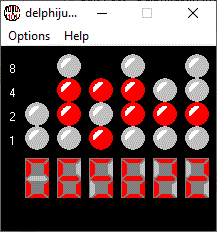
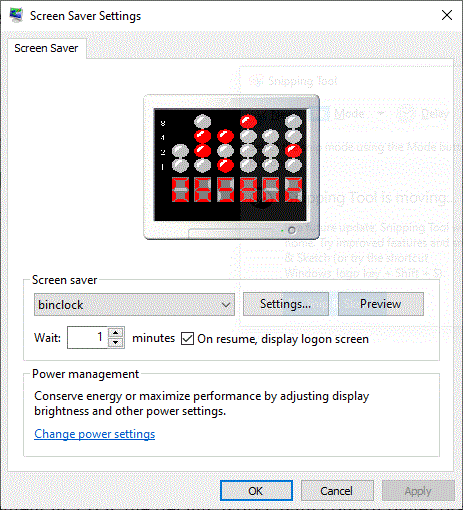
This screensaver shows the LED Binary Clock on the desktop. It can be used as a screensaver or as a regular app.
It has features such as:
* Can use UTC instead of local timezone
* Use a different TimeZone rather than what windows was setup for.
* Can display 12-hour format time(default) or 24-hour format.
* Can change the way things look in it, such as LED Colors,LED Styles, Background color and font.

NEW VERSION 3.0
* can put the clock onto wallpaper
* use the delphijustin time server or your own.
* You can now have separate LED colors.
* Have it update the time or show the pattern used in binary clock to tell you that the time needs to be set(just like a real binary clock)
* A optional AM/PM LED

New improvement in 2.0 is the design, works with control panel preview monitor and many more!

All programs are virus free. Some antivirus software might say its "suspicious" or a "Potentionaly Unwanted Program". Some of them rate them on what there code looks like no matter if theres a definition in the virus database. If any of them are detected any Antivirus I will zip the software with the password "justin" j is lowercase

Version 3.0 willl be availble soon

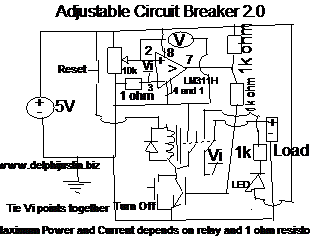
Adjustable Circuit Breaker

Tired of having to replace fuses for your projects? Different projects require different current ratings? Then you should build this circuit!

All you need is

  • 1x Voltage Comparator(Like LM311) or an Opamp make sure that they are compatible with a single supply
  • 1x Shunt Resistor(use 1 ohm if you are planing on using panel voltmeter(the voltmeters should be around the expected current measurement)
  • A potentiometer for adjusting the maximum current, it is used as a variable Voltage Divider. its voltage equals maximum current to which if greather than or equal to the voltage it will turn the project off.
  • Normally Closed for the reset button
  • Normally Open for turn off button(NOTE: CURRENT STILL FLOWS WHEN TURNED OFF/TRIPPED).
  • A NPN transistor, relay and snubber diode.

The relay acts as the switching element which can turn off the project when too much current is drawn. The voltage comparator/Opamp compares the voltage and outputs a logic 1 or 0 depending on how much more the voltage is on the positive input and negative input pins.

Schematic:

figure 1 Schematic

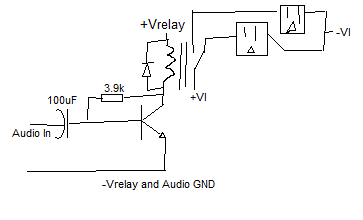
Audio Relay Driver Circuit

This circuit can be used for flashing lights to sound coming from a computer,iPod,mp3, CD Player, etc… The circuit works as a Single Transistor Amplifier. It works best with songs with a lot of bass. Works well even with House Current! The transistor can almost be any NPN transistor, as long as the relay doesn’t draw too much current or wattage(whichever comes first). I decided to use this circuit to flash Christmas Lights.

Figure A. Circuit with outlets for flashing Christmas Lights
delphijustin Industries is an Autism Supported Business
Social Media Auto Publish Powered By : XYZScripts.com
All in one
Start
Amazon.com OH Columbus
Your cart is empty.
96612